Mounting Commits As Folders
Note
This feature requires FUSE and the mfusepy package.
New in v1.6.0.
You can explore the contents of the entire repository at any point in time by “mounting” a commit as a folder that you can browse in your favorite file manager.
Right-click a commit in the Commit History and select Mount Commit As Folder in the context menu. GitFourchette will create a temporary mount point containing the commit’s file tree for you, and it’ll open your file manager to that location.
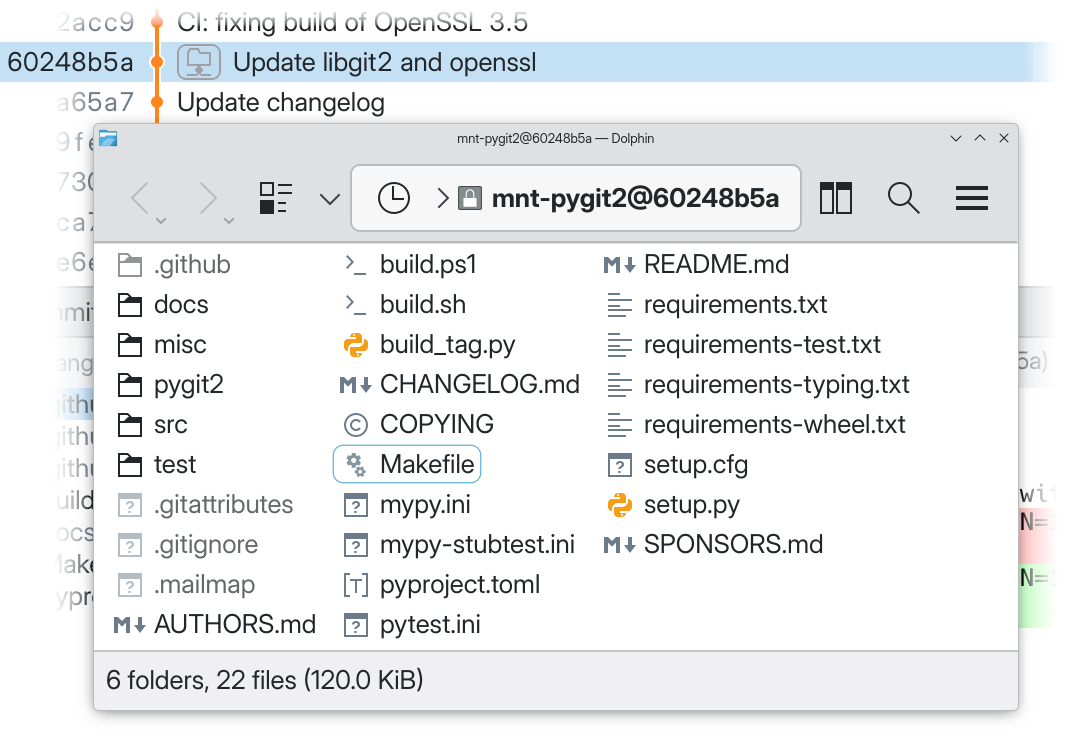
A “mounted commit” shown in the Dolphin file manager atop GitFourchette’s window.
You can mount several commits at a time. Commits that are currently mounted are adorned with a folder icon  in the Graph View.
Once you’ve created a mount point, a Mount menu appears in the main menu bar. From there, you can reopen the folder, start a terminal in it, or unmount it.
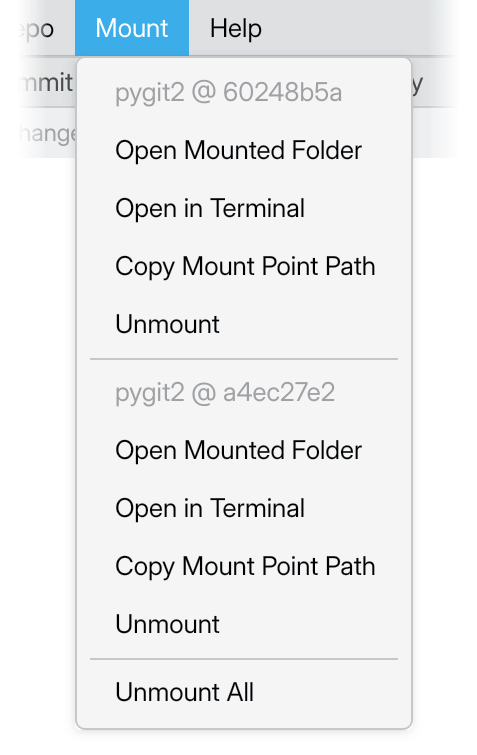
The “Mount” menu that appears once you’ve created a mount point.
Tip
The mount point is read-only and it only exists as long as GitFourchette remains open. It will be unmounted when you close GitFourchette. If you need write access to the files, consider checking out the commit in question instead.
Note
Mount points do not use extra disk space. GitFourchette installs a userspace filesystem (via FUSE) that serves the source tree using your repository’s Git object database.